

N8N
n8n (short for “nodemation”) is an open-source workflow automation platform that allows users to connect different apps, services, and APIs without heavy coding. It enables automation of repetitive tasks, integration of business tools, and creation of complex workflows. Available on desktop, web, and self-hosted environments, n8n is designed for flexibility and scalability, making it suitable for individuals, teams, and enterprises.
Key Features
Workflow Automation
Automate multi-step processes across different apps and services.
600+ Integrations
Prebuilt connectors for CRMs, databases, messaging apps, and cloud services.
Visual Workflow Builder
Drag-and-drop interface for building automations without coding.
Self-Hosting Option
Run n8n on your own server for data privacy and compliance.
Custom Nodes
Extend functionality by building custom integrations.
Scalable Deployments
Suitable for startups to enterprise-level automation needs.
Pros & Cons
Pros
-Open-source with flexible hosting (cloud or self-hosted).
-Supports advanced integrations and custom coding.
-Affordable compared to other automation tools.
-Large community with constant updates and new integrations.
Cons
-Steeper learning curve for non-technical users compared to simple automation tools (e.g., Zapier).
-Cloud version has usage-based pricing limits.
-Requires setup and server management if self-hosted.
-Some advanced features may require coding knowledge.
Cost Estimation
Starter Plan
Price: $24 USD / month
Features:
-Managed hosting via n8n Cloud
-A certain number of workflow executions (e.g. 2,500)
-1 Shared projects, moderate concurrency, basic support
Best For: Small teams, startups, and users automating basic workflows.
Pro Plan
Price: $24 USD / month
Features:
-Everything in Starter, plus: 10k executions, greater concurrency
-3 shared projects, advanced integrations
-Priority support
Best For: Medium businesses that need more automation scale and reliability.
Business Plan
Price: $800 USD / month
Features:
-All Pro features
-Git version control, queue scaling, SSO, environments
-High performance, enterprise workflows, advanced support
Best For: Larger organizations or those pushing automation into production at scale.
Business Application
Customer Support
Automating ticket management and CRM updates.
Marketing
Connecting email marketing platforms, CRMs, and analytics tools.
Finance
Automating invoice processing and payment reminders.
IT & Operation
Monitoring servers, error handling, and automated alerts.
E-Commerce
Syncing inventory, orders, and customer notifications.
Guidelines

Decide Hosting or Deployment Method
Choose between n8n Cloud (hosted by n8n) or Self-Hosting (run on your own server).
If self-hosting, follow the official docs to install via Docker, npm, or other supported setups.
If using cloud, sign up for n8n Cloud to skip server setup.

Quick Start / First Workflow
Use the n8n Quickstart guide to build your first workflow.
The “Your First Workflow” tutorial walks you through creating a simple workflow (trigger → action) using built-in nodes.
Follow the visual workflow builder in the docs: drag nodes, connect them, configure parameters.

Understand Workflow Components
Triggers: What starts a workflow (e.g. webhook, schedule, new email).
Nodes / Actions: What happens after a trigger (e.g. send email, update database).
Connections / Flow: How nodes connect and data passes between them.
Use the Expressions / Variables features to manipulate data.

Create & Configure a Workflow
Create a new workflow in the dashboard or editor.
Add a trigger node (e.g. “HTTP Request” or “Cron”).
Add subsequent action nodes (e.g. “Send Email,” “HTTP Request,” “Set Variable”).
Configure each node’s settings (credentials, data fields, conditions).
Use the “Test Execution” or “Execute Workflow” function to validate.

Test & Debug
Run the workflow manually or trigger it with test data.
Check execution logs and error messages in the UI.
Use the “Execution → Node Data” view to inspect data passing through each node.
Adjust node settings or data mappings if errors occur.

Activate / Deploy Workflow
Once tested and working, activate the workflow so it runs automatically on triggers.
Ensure your environment (if self-hosted) is stable and running.
Monitor performance, usage, and logs consistently.

Add Error Handling & Retries
Incorporate nodes for error catching, conditional checks, and fallback actions.
Use retry settings or “If” logic to handle exceptions.
Log errors or send alerts in case of failures.

Versioning & Maintenance
Maintain backups of workflow configurations.
When updating workflows, consider version control (exporting JSON definitions).
Periodically review workflows to remove outdated nodes or optimize performance.

Advanced Use Cases & Integrations
Use custom or community nodes for integrations (APIs, databases, messaging platforms).
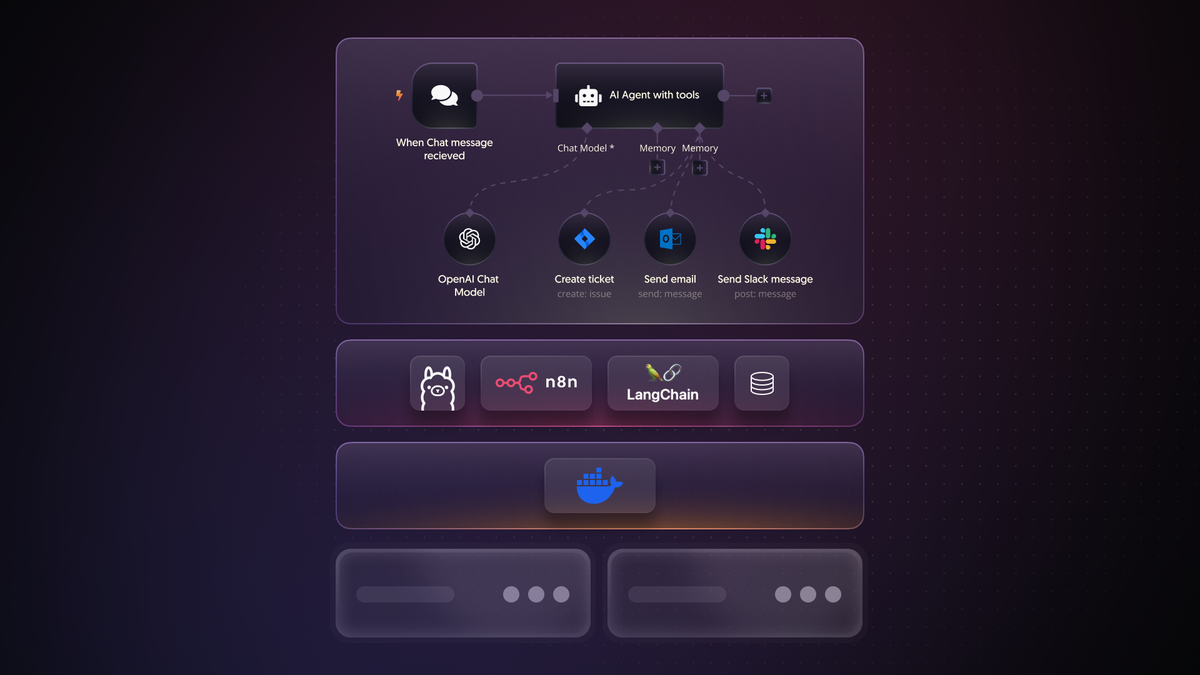
Build automated AI workflows by combining n8n with AI tools (text generation, summarization) using HTTP / API nodes.
Chain workflows: one workflow triggering another via webhook or API.

Learn & Explore More
Follow the n8n Learning Path and courses on the official docs.
Browse community forums and tutorials for real-world examples.
https://community.n8n.io/c/getting-started-with-n8n/docs-and-tutorials/6?utm_source=chatgpt.com
Watch video tutorials, like the “n8n Quick Start Tutorial” on YouTube.